

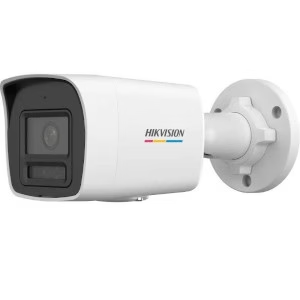
Hikvision DS-2CD1047G2H-LIU | Advanced ColorVu Smart Hybrid Light IP Bullet Camera with AI Detection
Advanced Hikvision DS-2CD1047G2H-LIU 4MP ColorVu Smart Hybrid Light IP Bullet Camera with AI human & vehicle detection, full-color night vision, built-in microphone, H.265+ compression, and IP67 outdoor protection.
₦97,361.57₦90,568.90 -
Hikvision DS-2CD1047G2H-LIU 4MP ColorVu Smart Hybrid Light IP Bullet Camera
The Hikvision DS-2CD1047G2H-LIU 4MP ColorVu Smart Hybrid Light IP Bullet Camera is an advanced, high-performance surveillance solution designed for users who demand true full-color night video, intelligent detection, and long-term reliability. Powered by ColorVu technology with a super-aperture F1.0 lens, this camera delivers vivid 4MP images even in near-total darkness.
With a 1/3″ Progressive Scan CMOS sensor and a maximum resolution of 2560 × 1440, the camera captures exceptional detail for homes, offices, estates, warehouses, schools, hotels, petrol stations, and perimeter security applications.
ColorVu Smart Hybrid Light for 24/7 Full-Color Security
Unlike traditional infrared cameras, the Hikvision DS-2CD1047G2H-LIU 4MP ColorVu Smart Hybrid Light IP Camera intelligently combines white light and IR illumination, automatically adapting to the environment. This ensures full-color footage at night while reducing light pollution and acting as a strong visual deterrent.
AI Human & Vehicle Detection
Built-in AI-powered human and vehicle classification dramatically reduces false alarms triggered by rain, shadows, animals, or moving leaves. This makes the camera ideal for high-accuracy security monitoring in both residential and commercial environments.
Audio, Storage Efficiency & Network Integration
The built-in microphone enables real-time audio recording, adding context to video footage. Using H.265+ compression, storage and bandwidth usage are reduced without sacrificing image quality—perfect for long-term recording on Hikvision NVRs. The camera integrates seamlessly with Hik-Connect, iVMS-4200, and ONVIF-compatible systems.
Rugged Outdoor Design
Engineered for durability, the camera features IP67 water and dust protection, ensuring reliable operation in harsh Nigerian weather conditions. With PoE support, installation is clean, flexible, and cost-effective.
Product Specifications
Camera
- Image Sensor: 1/3″ Progressive Scan CMOS
- Resolution: 2560 × 1440 (4MP)
- Minimum Illumination: 0.001 Lux (Color)
- Shutter Speed: 1/3 s – 1/100,000 s
- Day/Night: IR Cut Filter
- Angle Adjustment: Pan 0°–360°, Tilt 0°–90°, Rotate 0°–360°
Lens
- Lens Type: Fixed (2.8mm / 4mm optional)
- Aperture: F1.0
- Field of View:
- 2.8mm: 115° (H) / 60° (V)
- 4mm: 94° (H) / 50° (V)
Illuminator
- Light Type: IR + White Light
- Range: Up to 30m
- Smart Hybrid Light: Yes
Video & Audio
- Compression: H.265+/H.265/H.264+/H.264
- Max Bitrate: 16 Mbps
- Built-in Microphone: Yes
- Audio Compression: G.711, AAC-LC, MP2L2, G.726
Network
- Ethernet: RJ45 10/100 Mbps
- Protocols: IPv4/IPv6, RTSP, HTTP, FTP, SMTP, QoS
- Users: Up to 32
General
- Power: 12V DC / PoE (802.3af)
- Max Power: 7.5W
- Protection: IP67
- Dimensions: 69.8 × 67.9 × 172.9 mm
- Weight: Approx. 550g
Hikvision DS-2CD1047G2H-LIU vs Standard IR Cameras
| Feature | DS-2CD1047G2H-LIU | Standard IR Camera |
|---|---|---|
| Night Vision | Full Color (ColorVu) | Black & White |
| Lens Aperture | F1.0 Super Aperture | F1.6 – F2.0 |
| AI Detection | Human & Vehicle | Motion Only |
| Smart Light | Hybrid IR + White Light | IR Only |
| False Alarms | Very Low | High |
| Audio Recording | Built-in Microphone | Not Available |
| Outdoor Rating | IP67 | IP66 / Lower |
Applications
- Residential perimeter security
- Office buildings & warehouses
- Retail shops & shopping plazas
- Hotels, schools & hospitals
- Fuel stations & car parks
- Estate and gated community surveillance
Recommended Installation Accessories
- Hikvision PoE NVRs
- CAT6 Outdoor Ethernet Cable
- PoE Network Switch
- UPS for CCTV Systems
🧠 Installer Best Practices
- Avoid direct sunlight into the lens
- Mount at 2.5 – 4 meters height
- Enable Smart Hybrid Light to reduce light pollution
- Use UPS for power stability in Nigeria
Step-by-Step Installation Procedure
Step 1: Mounting the Camera
- Select a solid mounting surface (wall or pole).
- Drill mounting holes using the bracket as a guide.
- Secure the camera bracket using wall plugs and screws.
- Adjust pan, tilt, and rotation for optimal coverage.
Step 2: Network & Power Connection
Option A: PoE Connection (Recommended)
- Connect a CAT6 cable from the camera to a PoE switch or PoE NVR.
- The camera receives power + data over one cable.
Option B: DC Power Connection
- Connect a 12V DC power adapter to the camera.
- Connect Ethernet cable to network switch or router.
Step 3: Camera Activation
- Install SADP Tool or use Hik-Connect App.
- Detect the camera on the network.
- Activate by setting:
- Admin password
- IP address (DHCP or Static)
Step 4: NVR Integration
- Log into the Hikvision NVR.
- Add camera via Plug-and-Play or Manual IP.
- Assign recording schedule.
- Enable AI Human & Vehicle Detection.
Based on 0 reviews
Only logged in customers who have purchased this product may leave a review.
Related products
-
Hikvision, Digital Video Recorder, Turbo HD DVR
Hikvision DS-7204HQHI-K2 4ch Turbo 4.0 HD DVR support 1080P Hdtvi/ahd/Analog/IP with 2 SATA
 Hikvision, Digital Video Recorder, Turbo HD DVR
Hikvision DS-7204HQHI-K2 4ch Turbo 4.0 HD DVR support 1080P Hdtvi/ahd/Analog/IP with 2 SATA
- H.265 Pro+/H.265 Pro/H.265/H.264+/H.264 encoding for the main
stream, and H.265/H.264 for the sub-stream of analog cameras - Self-adaptive HDTVI/HDCVI/AHD/CVBS signal input
- Connectable to H.265+/H.265/H.264+/H.264 IP cameras
- Up to 4MP lite resolution for recording
- HDMI output at up to 4K (3840 x 2160) resolution for DS-7216HQHI-K2
- Long distance transmission over UTP and coaxial cable
- 4/8/16-ch synchronous playback
- 2 SATA HD Interface
SKU: DS-7204HQHI-K2 - H.265 Pro+/H.265 Pro/H.265/H.264+/H.264 encoding for the main
-
Hikvision, Digital Video Recorder, Turbo HD DVR
Hikvision DS-7104HQHI-K1 | 4Ch Turbo HD DVR with audio
 Hikvision, Digital Video Recorder, Turbo HD DVR
Hikvision DS-7104HQHI-K1 | 4Ch Turbo HD DVR with audio
Video Input and Transmission
Connectable to Turbo HD/HDCVI/AHD/CVBS signal input
Long distance transmission over UTP and coaxial cable: max. 1200m for 720p Turbo HD signal
Compression and Recording
One-key enable H.264+ compression to improve encoding efficiency by up to 50% and reduce data storage costs
l Supports 1080p lite of all channels and when enabled, the image effect is similar with 1080p
SKU: DS-7104HQHI-K1 -
Hikvision, Digital Video Recorder, Turbo HD DVR
Hikvision iDS-7204HQHI-M1/S 4-ch 1080p 1U H.265 AcuSense DVR Hdtvi/ahd/Analog/IP with audio
 Hikvision, Digital Video Recorder, Turbo HD DVR
Hikvision iDS-7204HQHI-M1/S 4-ch 1080p 1U H.265 AcuSense DVR Hdtvi/ahd/Analog/IP with audio
- 4 channels and 1 HDD 1U AcuSense DVR
- Provides detailed information with face detection
- False alarm reduction through human and vehicle target classification based on deep learning
- Efficient H.265 pro+ compression technology
- Encoding ability up to 1080p @ 15 fps
- 5 signals input adaptively (HDTVI/AHD/CVI/CVBS/IP)
- Up to 6 network cameras can be connected.
SKU: iDS-7204HQHI-M1/S
There are no reviews yet.